Text to imagePortraitStyle guide
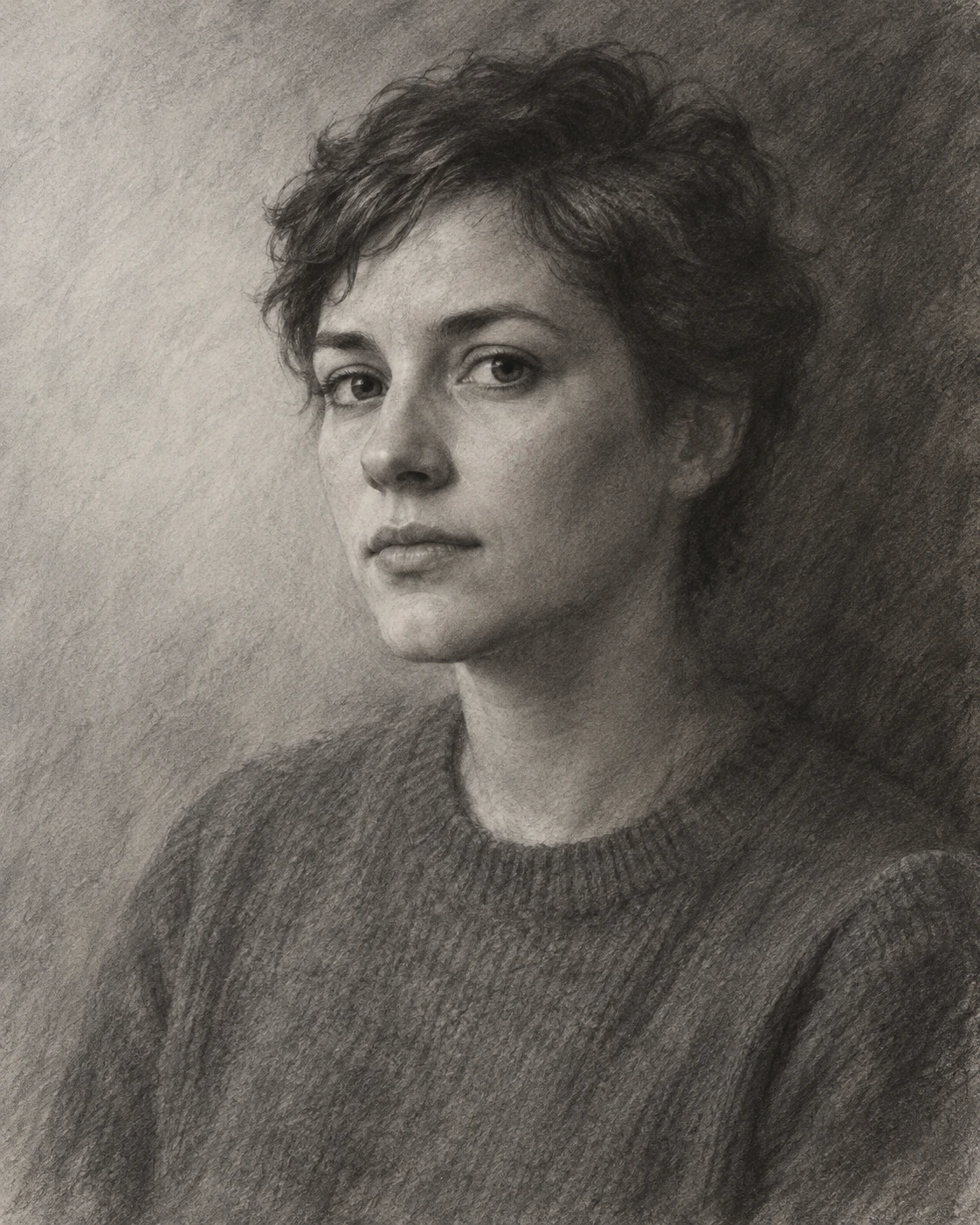
Adult in a Gray Sweater · Lost-and-Found Edges
A charcoal portrait that merges selected head and shoulder edges into the background while crisp facial edges hold attention.
Adult in a Gray Sweater · Lost-and-Found Edges
- Shape & line
- Build the face with broad charcoal shapes and a few decisive strokes for the eyelids, nostrils, and mouth seam. Keep the image-left forehead and cheek contour clearly readable, but stop the outline along parts of the image-right hair and shoulder where their values merge with the background.
- Color & light
- Use grayscale with a broad, soft light from upper image-left. Set the background lighter beside the image-left face and darker behind the image-right hair and sweater; match those dark edge values locally so the silhouette disappears in selected passages while the lit face remains distinct.
- Texture & material
- Let matte paper grain show through broad side-of-charcoal marks in the hair, sweater, and background. Blend the cheek transitions lightly and lift a few soft highlights with an eraser; retain broken charcoal deposits around the disappearing edges instead of polishing them into smooth digital gradients.
- Composition
- Concentrate the sharpest edges around the eyes and the image-left facial contour. Recover a short, visible shoulder edge below the merged image-right passage, so the viewer can reconnect the form; keep the surrounding background broad and quiet to make this alternation of lost and found edges easy to see.
Priority
Prioritize selective edge disappearance through matching adjacent values while preserving a readable face.
What to avoid & what to check
Avoid a continuous dark outline or uniform blur across the entire portrait.
Check that the image-right silhouette disappears in places and returns below, while the eyes remain crisp.
Exact prompt for this example
SUBJECT
One adult with short, softly tousled hair wearing a plain gray crewneck sweater, with a relaxed closed mouth and eyes looking toward the viewer.

COMPOSITION
An eye-level, chest-up portrait in a vertical frame; place the head slightly right of center, turn the face gently toward image-left, and leave open background space on image-left.

STYLE GUIDE
1. Shape & line
Build the face with broad charcoal shapes and a few decisive strokes for the eyelids, nostrils, and mouth seam. Keep the image-left forehead and cheek contour clearly readable, but stop the outline along parts of the image-right hair and shoulder where their values merge with the background.

2. Color & light
Use grayscale with a broad, soft light from upper image-left. Set the background lighter beside the image-left face and darker behind the image-right hair and sweater; match those dark edge values locally so the silhouette disappears in selected passages while the lit face remains distinct.

3. Texture & material
Let matte paper grain show through broad side-of-charcoal marks in the hair, sweater, and background. Blend the cheek transitions lightly and lift a few soft highlights with an eraser; retain broken charcoal deposits around the disappearing edges instead of polishing them into smooth digital gradients.

4. Composition
Concentrate the sharpest edges around the eyes and the image-left facial contour. Recover a short, visible shoulder edge below the merged image-right passage, so the viewer can reconnect the form; keep the surrounding background broad and quiet to make this alternation of lost and found edges easy to see.

PRIORITY
Preserve the requested identity, count, action, composition and output settings. Apply the style rules within those constraints; a style reference must not replace the subject or layout. Within the style: Prioritize selective edge disappearance through matching adjacent values while preserving a readable face.

AVOID
Avoid a continuous dark outline or uniform blur across the entire portrait.

OUTPUT
One finished portrait image, 4:5 aspect ratio, with no lettering, captions, signatures, or watermark.

SELF-CHECK
Check that the image-right silhouette disappears in places and returns below, while the eyes remain crisp.
Model information comes from image provenance. The same prompt may produce a different result.