Text to imageArt stylesStyle guide
One Pear · Salt-Bloom Watercolor
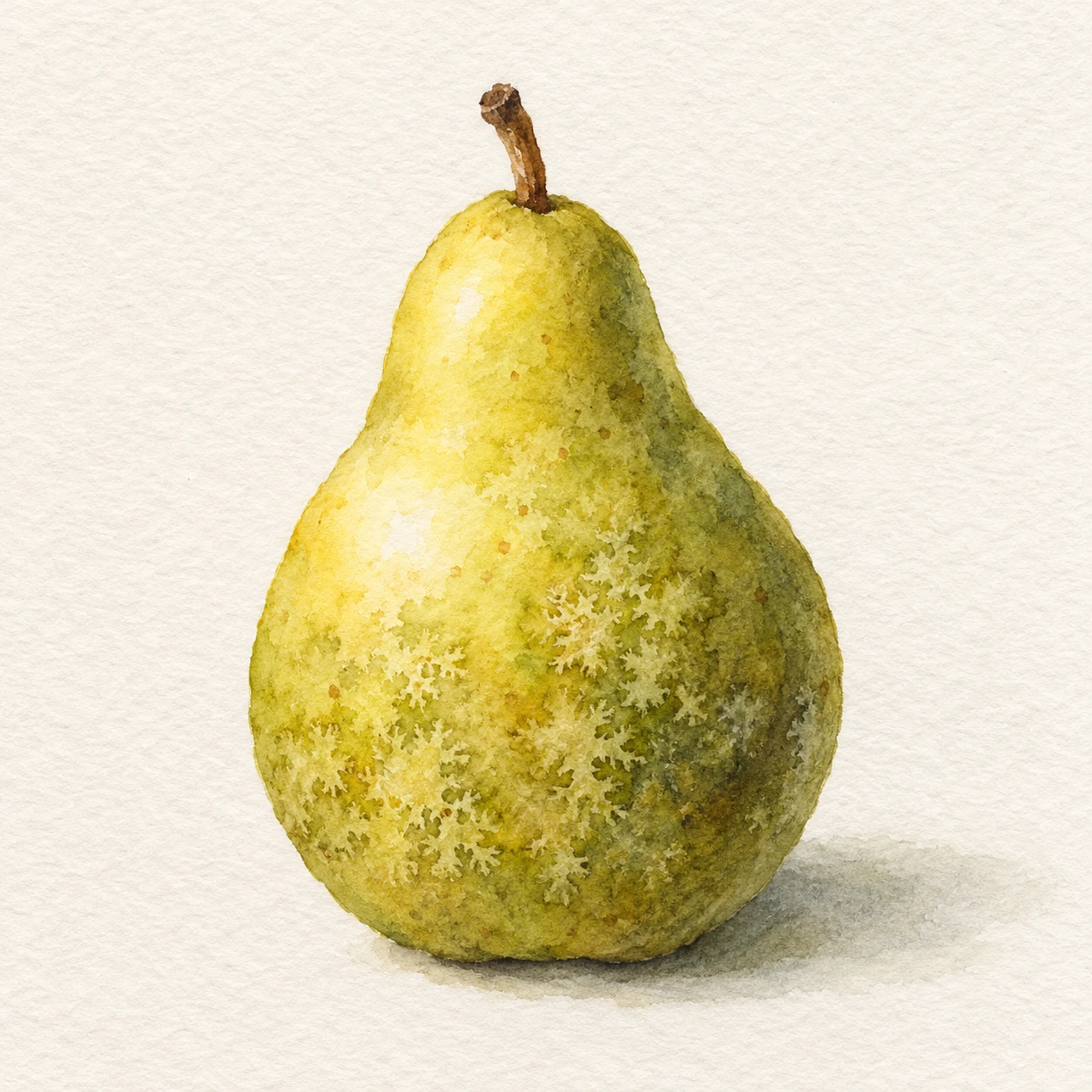
Model a rounded pear with pale, star-like blooms created by sprinkling salt into wet watercolor.
One Pear · Salt-Bloom Watercolor
- Shape & line
- Build the pear silhouette with transparent brush washes: narrow the neck beneath the stem and broaden the lower body asymmetrically. Keep the outer boundary mostly clear, with a few softly feathered sections, and define the stem with two simple tapered brown strokes.
- Color & light
- Place the light on the image's upper-left side. Preserve a pale yellow highlight on the pear's upper-left bulge, carry yellow-green through the middle, and deepen the lower-right curve with transparent olive washes. Extend a soft gray-green cast shadow from the base toward image-right.
- Texture & material
- Render salt blooms as irregular pale centers with short branching fringes where pigment has drawn away in damp washes. Cluster them loosely across the middle and lower body, vary their visible size, and let darker pigment collect around some fringes. Keep the highlight comparatively smooth so the salt texture remains selective.
- Composition
- Keep the pear as one large, readable painted mass against warm off-white paper. Confine the strongest bloom contrast inside its lower half, leave clear space around the stem, and soften the grounding shadow outward so neither scattered marks nor the shadow compete with the fruit.
Priority
Prioritize recognizable salt blooms within transparent watercolor while preserving the pear's rounded volume.
What to avoid & what to check
Avoid uniform dots, glitter-like crystals, and opaque chalky patches.
Check that irregular pale blooms have branching edges and that the smooth upper-left highlight still establishes the light direction.
Exact prompt for this example
SUBJECT
Show exactly one yellow-green pear with a short brown stem, standing upright on plain watercolor paper. Its small upper neck widens into a rounded lower body.

COMPOSITION
Use a square frame with the entire pear centered slightly below the midpoint, occupying about two-thirds of the image height. Leave generous paper margins and show a small grounding shadow beneath it.

STYLE GUIDE
1. Shape & line
Build the pear silhouette with transparent brush washes: narrow the neck beneath the stem and broaden the lower body asymmetrically. Keep the outer boundary mostly clear, with a few softly feathered sections, and define the stem with two simple tapered brown strokes.

2. Color & light
Place the light on the image's upper-left side. Preserve a pale yellow highlight on the pear's upper-left bulge, carry yellow-green through the middle, and deepen the lower-right curve with transparent olive washes. Extend a soft gray-green cast shadow from the base toward image-right.

3. Texture & material
Render salt blooms as irregular pale centers with short branching fringes where pigment has drawn away in damp washes. Cluster them loosely across the middle and lower body, vary their visible size, and let darker pigment collect around some fringes. Keep the highlight comparatively smooth so the salt texture remains selective.

4. Composition
Keep the pear as one large, readable painted mass against warm off-white paper. Confine the strongest bloom contrast inside its lower half, leave clear space around the stem, and soften the grounding shadow outward so neither scattered marks nor the shadow compete with the fruit.

PRIORITY
Preserve the requested identity, count, action, composition and output settings. Apply the style rules within those constraints; a style reference must not replace the subject or layout. Within the style: Prioritize recognizable salt blooms within transparent watercolor while preserving the pear's rounded volume.

AVOID
Avoid uniform dots, glitter-like crystals, and opaque chalky patches.

OUTPUT
Create one square watercolor reference image with no lettering, labels, signature, or watermark.

SELF-CHECK
Check that irregular pale blooms have branching edges and that the smooth upper-left highlight still establishes the light direction.
Model information comes from image provenance. The same prompt may produce a different result.