Text to imageSpace & architectureStyle guide
Small Rest Room · Indirect Cove Light
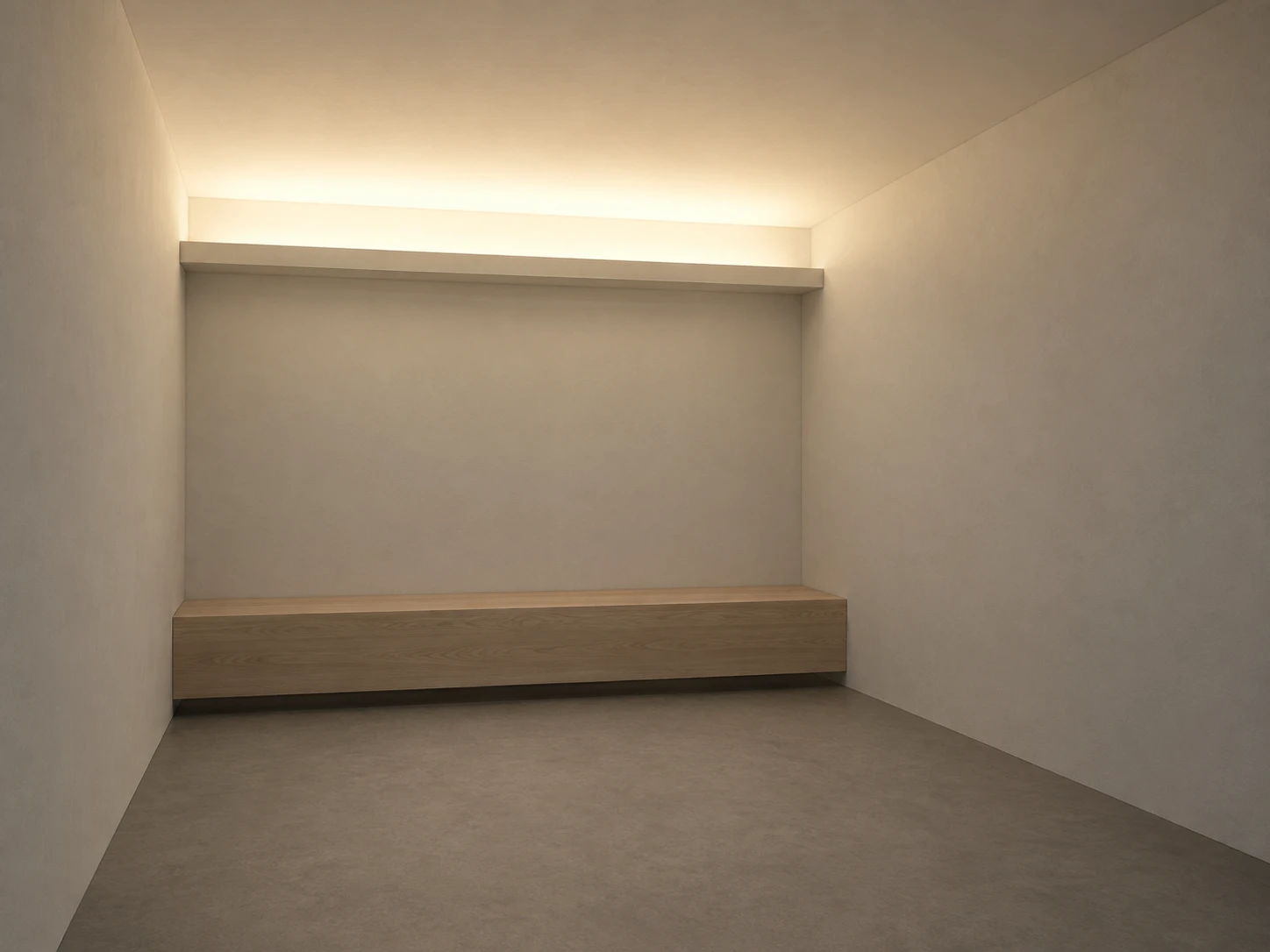
Light spreading from a ceiling cove shows how a concealed source illuminates a small rest room.
Small Rest Room · Indirect Cove Light
- Shape & line
- Construct the room from simple rectangular planes with straight vertical edges and consistent perspective convergence. Give the back-wall cove a clearly projecting horizontal lip; show its shaded underside so the viewer can understand how it hides the source.
- Color & light
- Make the ceiling brightest immediately above the back-wall cove, then let warm light soften and diminish toward the image's upper foreground. Keep the lower back wall and floor appreciably dimmer, with gentle bounced illumination rather than a sharp beam or a visible luminous strip.
- Texture & material
- Render the ceiling and walls as matte ivory plaster with restrained surface variation, allowing the light gradient to remain continuous. Give the bench pale wood grain and the floor a muted gray matte finish, with soft contact shadows and no polished reflections.
- Composition
- Place the back wall near the image center and let the right wall occupy the image-right side as a quieter, darker plane. Reserve roughly the upper third for the illuminated ceiling, keep the bench fully visible below the cove, and leave open floor in the foreground so the upward spread of light remains the main spatial cue.
Priority
Prioritize the concealed cove structure and the broad ceiling brightness gradient.
What to avoid & what to check
Avoid exposed light strips, hard spotlight cones and uniformly bright surfaces.
Check that the cove lip hides the source and the ceiling visibly brightens above it before fading toward the foreground.
Exact prompt for this example
SUBJECT
One small rectangular rest room with one low built-in bench against the back wall and one continuous lighting cove along the back wall's upper edge. The cove conceals its light source behind a projecting lip and directs light upward onto the ceiling.

COMPOSITION
Use a wide interior view from the front-left corner at standing eye level, looking toward the back wall. Show the entire bench, the back-wall cove, a generous ceiling area, the right wall and enough floor to establish the room's depth.

STYLE GUIDE
1. Shape & line
Construct the room from simple rectangular planes with straight vertical edges and consistent perspective convergence. Give the back-wall cove a clearly projecting horizontal lip; show its shaded underside so the viewer can understand how it hides the source.

2. Color & light
Make the ceiling brightest immediately above the back-wall cove, then let warm light soften and diminish toward the image's upper foreground. Keep the lower back wall and floor appreciably dimmer, with gentle bounced illumination rather than a sharp beam or a visible luminous strip.

3. Texture & material
Render the ceiling and walls as matte ivory plaster with restrained surface variation, allowing the light gradient to remain continuous. Give the bench pale wood grain and the floor a muted gray matte finish, with soft contact shadows and no polished reflections.

4. Composition
Place the back wall near the image center and let the right wall occupy the image-right side as a quieter, darker plane. Reserve roughly the upper third for the illuminated ceiling, keep the bench fully visible below the cove, and leave open floor in the foreground so the upward spread of light remains the main spatial cue.

PRIORITY
Preserve the requested identity, count, action, composition and output settings. Apply the style rules within those constraints; a style reference must not replace the subject or layout. Within the style: Prioritize the concealed cove structure and the broad ceiling brightness gradient.

AVOID
Avoid exposed light strips, hard spotlight cones and uniformly bright surfaces.

OUTPUT
Create one architectural visualization in a 4:3 landscape aspect ratio, with no lettering, labels, logos or watermark.

SELF-CHECK
Check that the cove lip hides the source and the ceiling visibly brightens above it before fading toward the foreground.
Model information comes from image provenance. The same prompt may produce a different result.