Text to imageCafe & brandStyle guide
A Giant Button at the Repair Shop
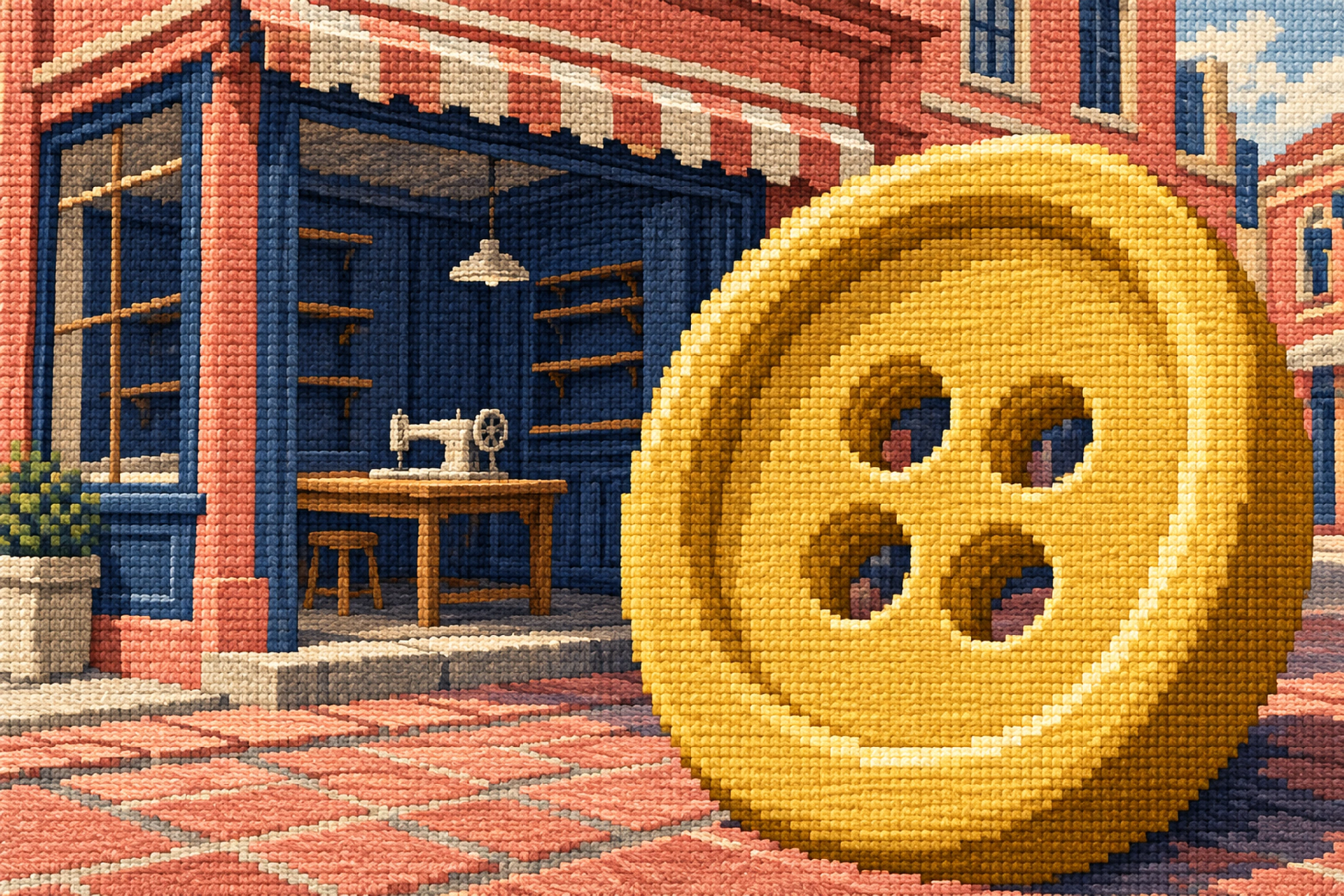
A button larger than the doorway stands outside an ordinary clothing repair shop. Woven pixels and stepped edges give a modest mending essential a monumental presence in a brand illustration.
Remix this referenceA Giant Button at the Repair Shop
- Form language
- Build forms from coarse woven pixel clusters, reducing small details to bold stepped shapes while keeping essential openings readable.
- Contour
- Use deliberate stair-step boundaries with occasional one-block notches; avoid smooth vector curves or continuous ink outlines.
- Mark-making
- Alternate short horizontal and vertical yarn floats within the blocks; let thread spacing and edge frays vary naturally.
- Surface rendering
- Group tones into chunky woven bands with sparse interlaced transition stitches; retain thread relief without smoothing away pixel edges.
Priority
Make the low-resolution shapes visibly woven, with deliberate pixel edges at every scale.
What to avoid & what to check
Exact prompt for this example
MODULE OWNERSHIP
subject: Subject count, type, stable proportions and landmarks, resting face geometry, hair shape, physical materials, garment construction and permanent marks. No emotion, movement, color assignment or rendering recipe.
expression: Facial soft-tissue displacement and pupil direction, muscle coordination, regional intensity, asymmetry and onset/peak/release. No head/body pose, stable appearance, skin color or rendering.
gesture: Head/neck/body/limb orientation, joint movement, support, contact and pose-caused occlusion using existing anatomy. No eye/pupil movement, emotion, identity, props inventory or camera.
props: Prop count, type, construction, physical material and scale relative to the subject. Holding/contact belongs to gesture, position to composition, color to palette.
scene: Environment elements, terrain, backdrop/floor presence and structural detail. No canvas positions, camera, lighting, assigned colors or render texture.
camera: Projection, focal-length impression, camera elevation/yaw/roll, viewing distance and crop. No actor pose, world placement, lighting or canvas aspect ratio.
composition: Normalized 0-100% canvas positions, scale in frame, depth/overlap, focal hierarchy and margins. No joint pose, camera projection, rendering, subject/prop inventory or emotion.
palette: Color anchors, hue/saturation/value ranges, colors assigned to parts and approximate color coverage. No illumination direction, shading algorithm, physical material or layout.
lighting: Light-source direction/softness/intensity, ambient illumination, physical shadow direction/length and highlight position. Absence of directional illumination is allowed. No shading technique, palette or material changes.
style: Reusable form abstraction, contour weight/taper/edge quality, medium and mark scale/density/direction, surface rendering and tonal transition technique. No fixed subject proportions, anatomy, identity, expression, pose, palette, light-source direction, camera or layout.
output: Image count, aspect ratio, size, file/alpha requirements and global lettering/logo/watermark restrictions. No background scenery, crop, style, identity or pose.

SUBJECT
inventory: One original oversized garment button, without people or animals.
geometry: A thick circular disk has a shallow dished face, a raised outer rim, and four broad sewing holes.
resting-face: No face or facial landmarks apply.
appearance: Molded solid resin with smoothly beveled holes and no decorative engraving.

PRIORITY


AVOID


CHECK


PROPS
inventory: One ordinary sewing machine and one rectangular worktable, both much smaller than the button.
construction: The machine has a cast-metal arm and handwheel; the wooden table has a broad top and plain trestle supports.

PRIORITY


AVOID


CHECK


SCENE
inventory: A small street-facing clothing repair shop with an open entry, broad display window, and paved threshold.
structure: A recessed shop bay reveals paneled interior walls and empty shelves beneath a shallow exterior awning.

PRIORITY


AVOID


CHECK


CAMERA
projection: Gentle wide-angle perspective keeps the storefront recognizable while expanding foreground depth.
viewpoint: View the storefront obliquely from slightly above ordinary eye level, with no camera roll.
crop: Include the shop opening and neighboring facade fragments; the lower crop cuts through the button's outer rim.

PRIORITY


AVOID


CHECK


COMPOSITION
placement: The giant button dominates the lower-right foreground; the open workshop occupies the upper-left area.
depth: The button overlaps part of the storefront; the table and machine remain legible within the recessed shop.
spacing: Make the button taller than the doorway; preserve an open pavement interval that exposes the startling scale difference.

PRIORITY


AVOID


CHECK


PALETTE
colors: Use butter yellow, deep indigo, dusty coral, and linen white.
assignment: The button is yellow, the shop recess indigo, the facade and paving coral, and the machine and sky linen white.
balance: Coral and indigo form the broad field; yellow supplies the main accent, with white kept to small breathing areas.

PRIORITY


AVOID


CHECK


LIGHTING
sources: Broad afternoon light enters from the upper left, with diffuse ambient light inside the shop.
shadows: Short shadows fall toward the right; the awning casts a broad shadow across the recessed entry.
highlights: A broad highlight follows the button's upper-left rim; the holes remain visibly shaded.

PRIORITY


AVOID


CHECK


STYLE GUIDE
form-language: Build forms from coarse woven pixel clusters, reducing small details to bold stepped shapes while keeping essential openings readable.
contour: Use deliberate stair-step boundaries with occasional one-block notches; avoid smooth vector curves or continuous ink outlines.
mark-making: Alternate short horizontal and vertical yarn floats within the blocks; let thread spacing and edge frays vary naturally.
surface-rendering: Group tones into chunky woven bands with sparse interlaced transition stitches; retain thread relief without smoothing away pixel edges.

PRIORITY
Make the low-resolution shapes visibly woven, with deliberate pixel edges at every scale.

AVOID


CHECK


OUTPUT
format: One image, landscape 3:2, 3000 × 2000 pixels, opaque PNG.
restrictions: No lettering, logos, signatures, or watermarks.

PRIORITY


AVOID


CHECK
Model information comes from image provenance. The same prompt may produce a different result.