Text to imageIllustrationStyle guide
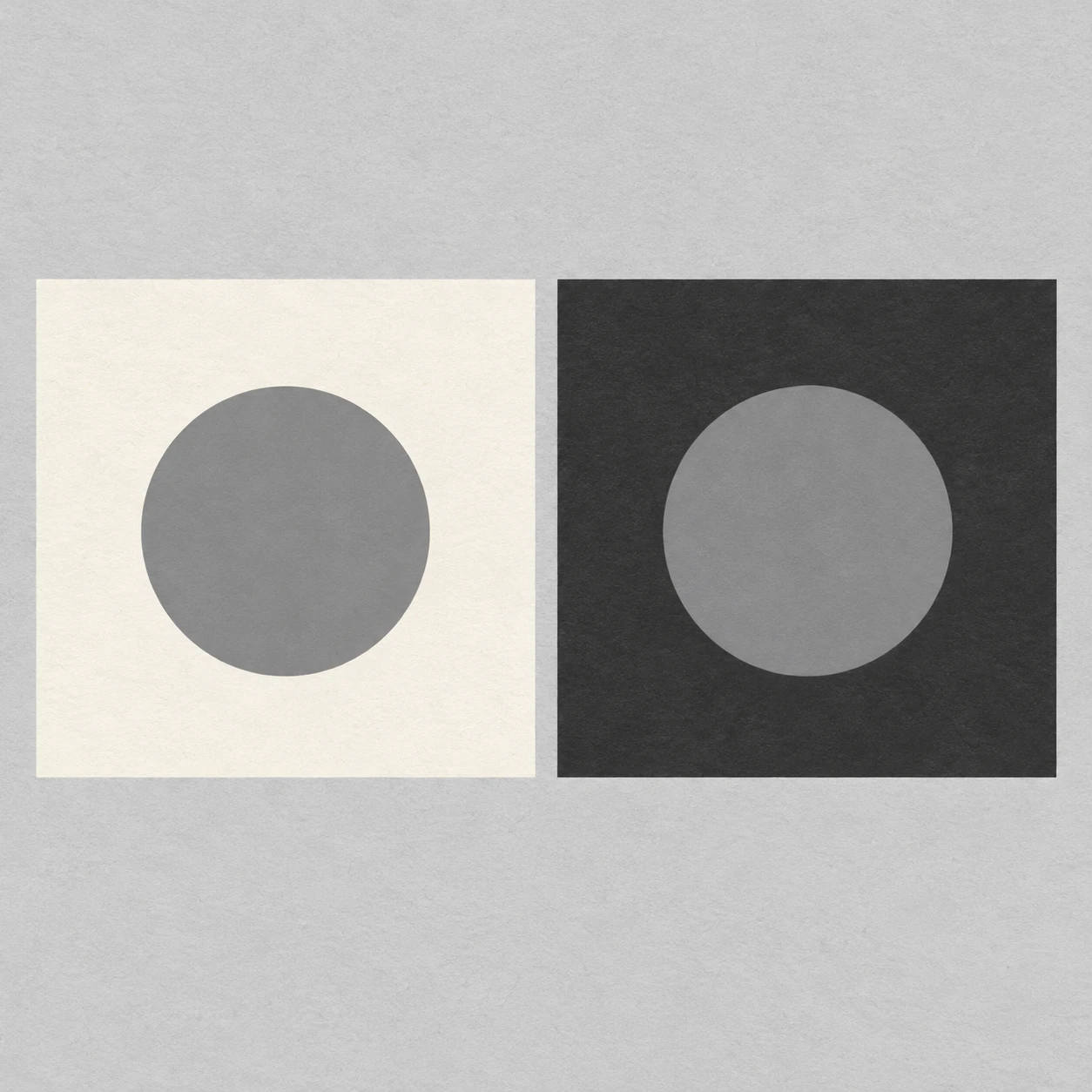
Two Gray Paper Disks · Simultaneous Value Contrast
Identical gray paper disks on light and dark grounds demonstrate how surrounding values change perceived brightness.
Two Gray Paper Disks · Simultaneous Value Contrast
- Shape & line
- Draw both disks as matching clean circles and both grounds as matching squares with straight edges. Use crisp cut-paper silhouettes without outlines, bevels, or perspective distortion so shape differences cannot explain the contrast.
- Color & light
- Fill both disks with exactly the same flat medium gray. Surround the image-left disk with pale ivory and the image-right disk with deep charcoal; the left disk should appear darker and the right disk lighter through their immediate surroundings alone. Keep illumination even and omit gradients and cast shadows.
- Texture & material
- Suggest matte paper with a faint, even fiber texture on the square grounds and neutral background. Keep the circular disks smooth and opaque, with no gloss or translucent edges, preserving an unambiguous comparison of their identical gray fills.
- Composition
- Center each disk within its square and make each disk roughly half the square's width, leaving a broad uninterrupted surround on every side. Give the two squares equal visual space and keep the neutral gap narrow enough for an immediate side-by-side brightness comparison.
Priority
Prioritize identical disk values and a clearly different perceived brightness caused by the surrounding grounds.
What to avoid & what to check
Avoid lightening the right disk or darkening the left disk to manufacture the effect.
Check that both disks share one gray fill while the disk on charcoal appears lighter than the disk on ivory.
Exact prompt for this example
SUBJECT
Exactly two identical medium-gray circular paper disks, each centered on its own square paper ground. The image-left ground is pale ivory; the image-right ground is deep charcoal. Both disks use the same gray fill.

COMPOSITION
A straight overhead view of two equally sized square grounds arranged side by side on a neutral light-gray background. Align their upper and lower edges and place the disks at the same height, with generous margins and a narrow neutral gap between the grounds.

STYLE GUIDE
1. Shape & line
Draw both disks as matching clean circles and both grounds as matching squares with straight edges. Use crisp cut-paper silhouettes without outlines, bevels, or perspective distortion so shape differences cannot explain the contrast.

2. Color & light
Fill both disks with exactly the same flat medium gray. Surround the image-left disk with pale ivory and the image-right disk with deep charcoal; the left disk should appear darker and the right disk lighter through their immediate surroundings alone. Keep illumination even and omit gradients and cast shadows.

3. Texture & material
Suggest matte paper with a faint, even fiber texture on the square grounds and neutral background. Keep the circular disks smooth and opaque, with no gloss or translucent edges, preserving an unambiguous comparison of their identical gray fills.

4. Composition
Center each disk within its square and make each disk roughly half the square's width, leaving a broad uninterrupted surround on every side. Give the two squares equal visual space and keep the neutral gap narrow enough for an immediate side-by-side brightness comparison.

PRIORITY
Preserve the requested identity, count, action, composition and output settings. Apply the style rules within those constraints; a style reference must not replace the subject or layout. Within the style: Prioritize identical disk values and a clearly different perceived brightness caused by the surrounding grounds.

AVOID
Avoid lightening the right disk or darkening the left disk to manufacture the effect.

OUTPUT
One square 1:1 illustration, with no text, labels, numbers, or watermark.

SELF-CHECK
Check that both disks share one gray fill while the disk on charcoal appears lighter than the disk on ivory.
Model information comes from image provenance. The same prompt may produce a different result.