Text to imageCharacterStyle guide
Curious Owl · Tilted Facial Axis
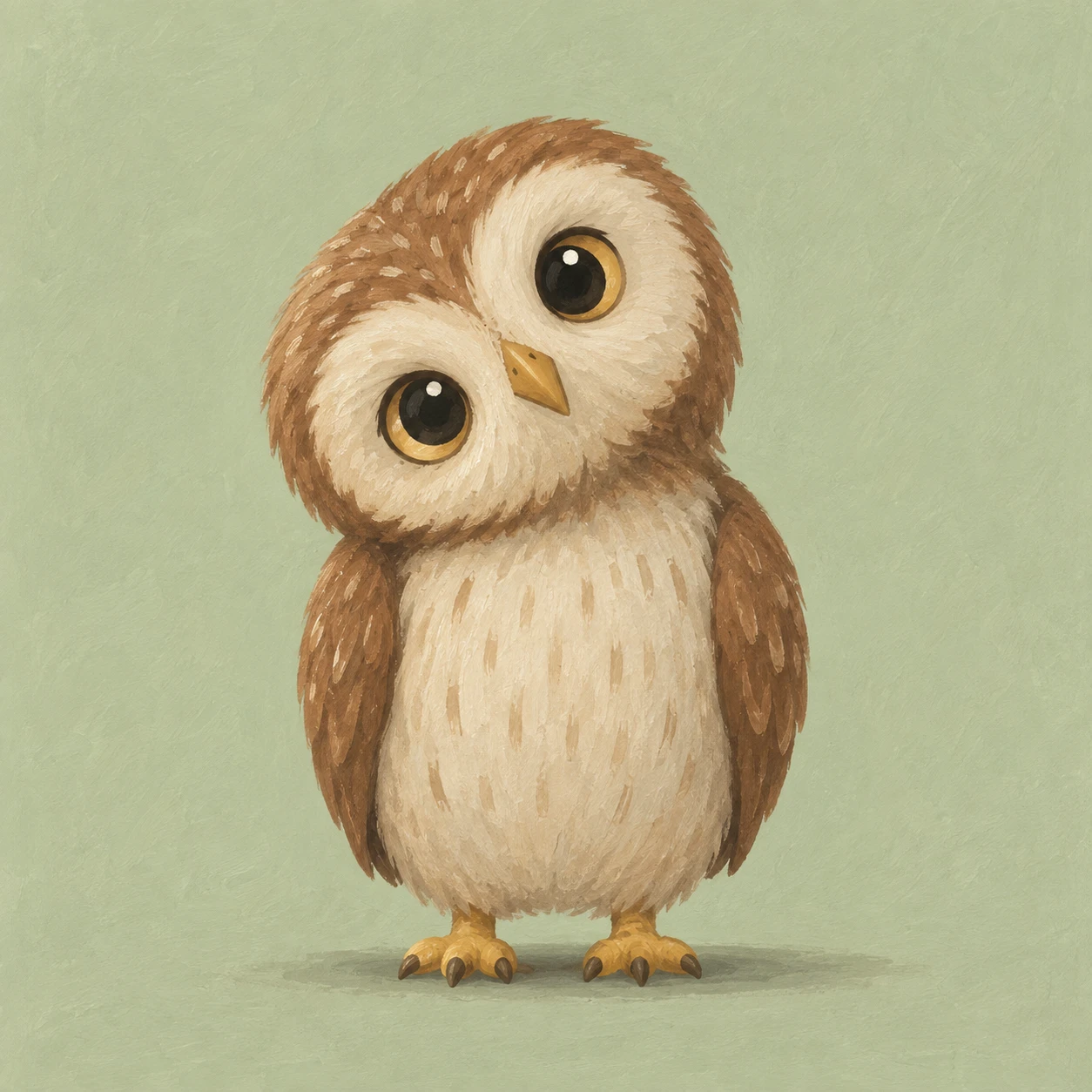
Align an owl’s eyes and beak to a shared tilted axis so its curious head tilt reads as one coherent movement.
Curious Owl · Tilted Facial Axis
- Shape & line
- Draw the head as a broad rounded shape leaning toward image-left. Place both eye centers on one diagonal rising toward image-right, then angle the beak’s centerline perpendicular to that diagonal so the facial landmarks rotate together. Keep the torso upright to make the head tilt visible.
- Color & light
- Use warm brown for the head and wings, cream for the facial patches and belly, and muted ochre for the beak and feet. Light the owl softly from upper image-left, with a restrained darker area beneath the head and along the image-right body edge; keep both eyes equally clear.
- Texture & material
- Render the character in opaque gouache with softly irregular painted edges. Add a few short feather strokes around the face that follow the tilted head’s contour, while belly strokes remain mostly vertical; preserve broad quiet color areas so the surface marks support the pose.
- Composition
- Place the owl against a plain pale sage background and leave a visible gap above its tilted head. Keep the feet level and add one small soft ground shadow beneath them. Give the eyes generous space within the face so their shared diagonal remains readable at thumbnail size.
Priority
Prioritize the coordinated tilt of the eyes and beak against the upright body.
What to avoid & what to check
Avoid keeping the eyes level or leaving the beak vertical while the head tilts.
Check that the image-left eye sits lower and the beak follows the same head rotation.
Exact prompt for this example
SUBJECT
One original small owl character stands on two feet with its body upright and its head tilted toward image-left. Two round eyes and one short triangular beak move together with the tilted head; both wings rest against the body.

COMPOSITION
Use a straight-on, full-body view with the owl centered and ample space around its head. Keep the torso vertical, place the image-left eye visibly lower than the image-right eye, and show both feet on one horizontal ground line.

STYLE GUIDE
1. Shape & line
Draw the head as a broad rounded shape leaning toward image-left. Place both eye centers on one diagonal rising toward image-right, then angle the beak’s centerline perpendicular to that diagonal so the facial landmarks rotate together. Keep the torso upright to make the head tilt visible.

2. Color & light
Use warm brown for the head and wings, cream for the facial patches and belly, and muted ochre for the beak and feet. Light the owl softly from upper image-left, with a restrained darker area beneath the head and along the image-right body edge; keep both eyes equally clear.

3. Texture & material
Render the character in opaque gouache with softly irregular painted edges. Add a few short feather strokes around the face that follow the tilted head’s contour, while belly strokes remain mostly vertical; preserve broad quiet color areas so the surface marks support the pose.

4. Composition
Place the owl against a plain pale sage background and leave a visible gap above its tilted head. Keep the feet level and add one small soft ground shadow beneath them. Give the eyes generous space within the face so their shared diagonal remains readable at thumbnail size.

PRIORITY
Preserve the requested identity, count, action, composition and output settings. Apply the style rules within those constraints; a style reference must not replace the subject or layout. Within the style: Prioritize the coordinated tilt of the eyes and beak against the upright body.

AVOID
Avoid keeping the eyes level or leaving the beak vertical while the head tilts.

OUTPUT
Create one square character illustration with no text, lettering, logos, or watermark.

SELF-CHECK
Check that the image-left eye sits lower and the beak follows the same head rotation.
Model information comes from image provenance. The same prompt may produce a different result.