Text to imagePortraitStyle guide
Short-Curled Adult · Short Lighting
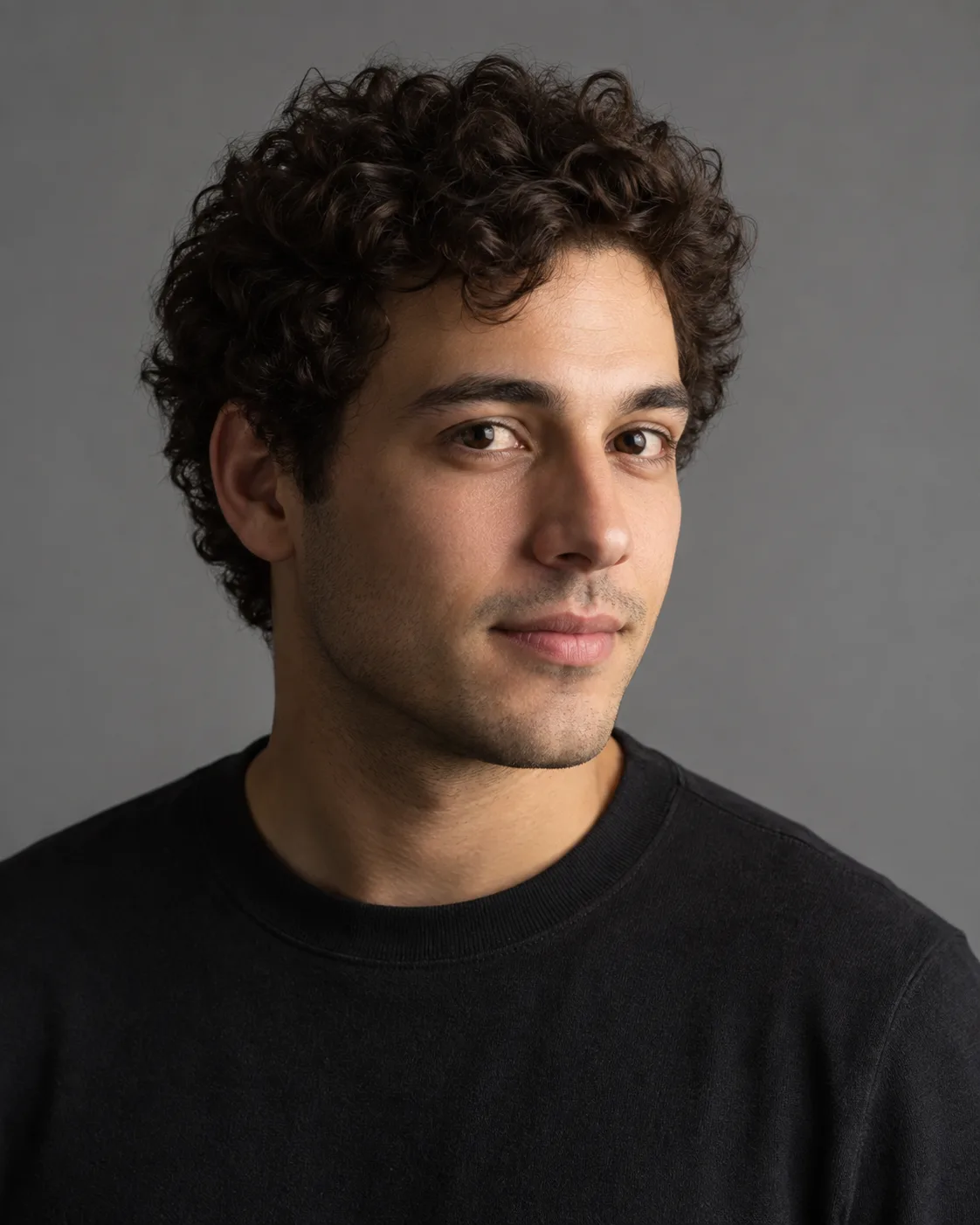
A studio portrait that sculpts the face by lighting the cheek farther from the camera while keeping the nearer cheek in shadow.
Short-Curled Adult · Short Lighting
- Shape & line
- Preserve natural facial proportions in a gentle three-quarter turn; describe the nose, jaw and brow through gradual tonal changes, keeping the eyes and lip contour clear without outlining every feature.
- Color & light
- Place one broad neutral studio key light off-camera to IMAGE RIGHT, on the side the face turns toward. Illuminate the narrow farther cheek on IMAGE RIGHT, while the broad nearer cheek on IMAGE LEFT remains visibly darker in soft shadow. The main cheek highlight belongs on image right. Retain warm natural skin color; use faint fill only to keep the shadow-side eye readable without making the broad image-left cheek brighter.
- Texture & material
- Render skin with restrained pores and small tonal variations, let curls gather into distinct soft clusters, and keep the shirt matte; hold the eyes in crisp focus while allowing the ears and rear hair to soften gently.
- Composition
- Set the face slightly off center with a little more open space in the direction of the head turn; use a muted medium-gray background that separates the shadowed cheek and dark curls, and keep the brightest area within the face.
Priority
Clearly show the narrow IMAGE-RIGHT cheek illuminated and the broad IMAGE-LEFT cheek in soft shadow.
What to avoid & what to check
Avoid flat frontal lighting, blocked facial shadows and glossy skin smoothing.
Check that both eyes remain readable and the shadowed facial contour separates from the background.
Exact prompt for this example
SUBJECT
One adult with short curly hair wearing a plain dark crewneck shirt, with relaxed lips and eyes directed toward the camera. Turn the head gently toward IMAGE RIGHT: the nearer cheek on IMAGE LEFT appears broader, and the farther cheek on IMAGE RIGHT appears narrower. Keep both eyes visible. This is a short-lit portrait: the narrow image-right cheek is illuminated and the broad image-left cheek is shadowed.

COMPOSITION
Frame a vertical head-and-shoulders portrait at eye level. Include the entire hair silhouette and both shoulders, with modest space above the head and a plain background.

STYLE GUIDE
1. Shape & line
Preserve natural facial proportions in a gentle three-quarter turn; describe the nose, jaw and brow through gradual tonal changes, keeping the eyes and lip contour clear without outlining every feature.

2. Color & light
Place one broad neutral studio key light off-camera to IMAGE RIGHT, on the side the face turns toward. Illuminate the narrow farther cheek on IMAGE RIGHT, while the broad nearer cheek on IMAGE LEFT remains visibly darker in soft shadow. The main cheek highlight belongs on image right. Retain warm natural skin color; use faint fill only to keep the shadow-side eye readable without making the broad image-left cheek brighter.

3. Texture & material
Render skin with restrained pores and small tonal variations, let curls gather into distinct soft clusters, and keep the shirt matte; hold the eyes in crisp focus while allowing the ears and rear hair to soften gently.

4. Composition
Set the face slightly off center with a little more open space in the direction of the head turn; use a muted medium-gray background that separates the shadowed cheek and dark curls, and keep the brightest area within the face.

PRIORITY
Preserve the requested identity, count, action, composition and output settings. Apply the style rules within those constraints; a style reference must not replace the subject or layout. Within the style: Clearly show the narrow IMAGE-RIGHT cheek illuminated and the broad IMAGE-LEFT cheek in soft shadow.

AVOID
Avoid flat frontal lighting, blocked facial shadows and glossy skin smoothing.

OUTPUT
Create one photographic image in a 4:5 portrait aspect ratio, with no lettering, captions, logos or watermark.

SELF-CHECK
Check that both eyes remain readable and the shadowed facial contour separates from the background.
Model information comes from image provenance. The same prompt may produce a different result.