Text to imageArt stylesStyle guide
One Apple · Halftone Screenprint
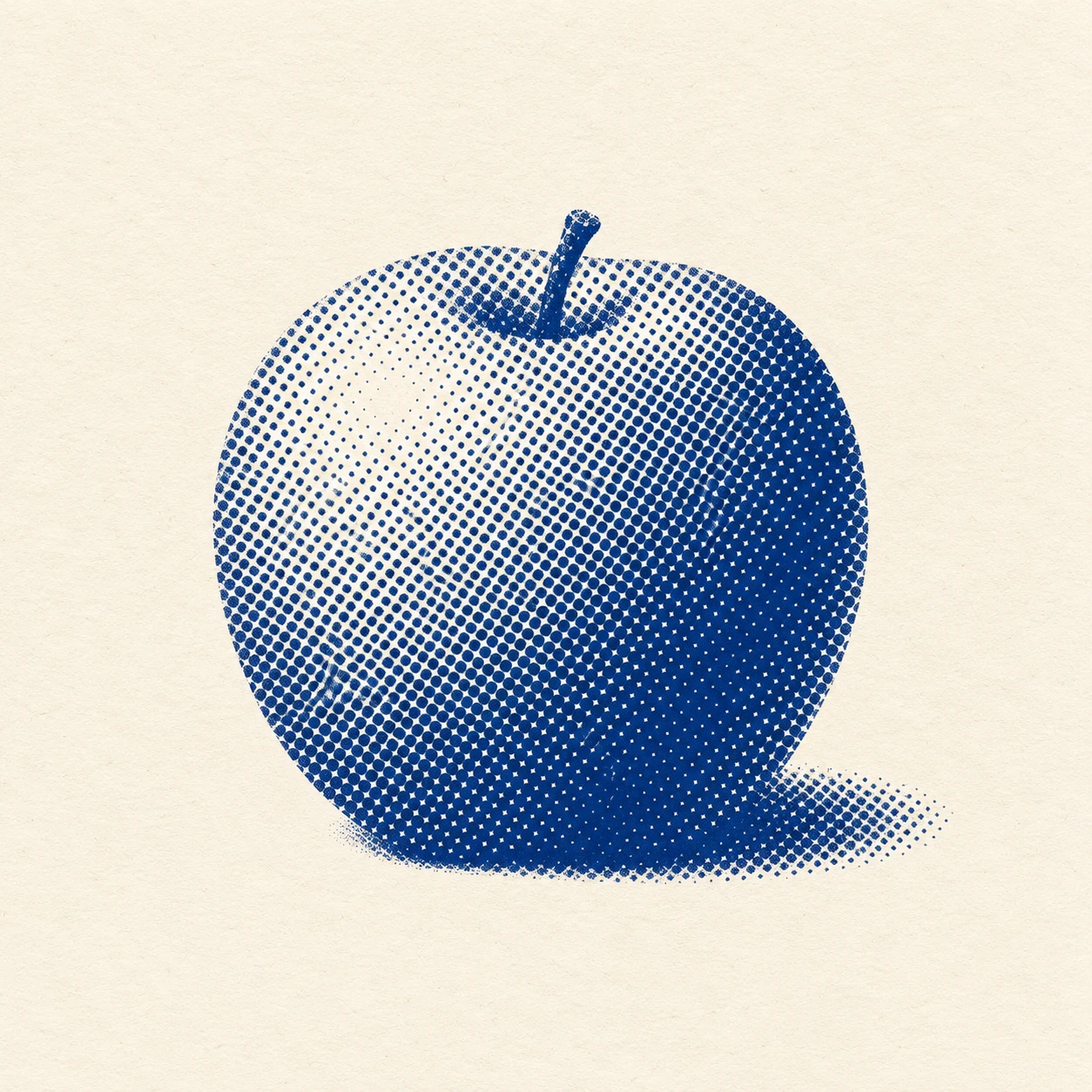
A monochrome screenprint style that models an apple’s rounded volume by varying the size of regularly spaced halftone dots.
One Apple · Halftone Screenprint
- Shape & line
- Build the apple from a broad, gently asymmetric silhouette with two rounded shoulders and a shallow dip around the short stem. Define its edge with the termination of the printed dot field, keeping the stem a simple solid ink shape.
- Color & light
- Use cobalt-blue ink and ivory paper as the only colors. Place the light on the upper image-left: leave a pale highlight there, enlarge the dots toward the lower image-right shadow, and extend a short dark cast shadow from the base toward image-right.
- Texture & material
- Keep the halftone dots on a consistent diagonal grid, changing dot size rather than spacing to create tone. Let large dots nearly join in the deepest shadow while small highlight dots remain clearly separated; add slight ink-edge softness and restrained paper grain without disrupting the grid.
- Composition
- Preserve a clean ivory margin around the whole apple and keep the background unprinted. Confine the cast shadow to a low, compact patch touching the fruit, so the silhouette reads immediately and the dot-size transition remains the main visual event.
Priority
Prioritize a readable apple silhouette and volume created by changing halftone dot size.
What to avoid & what to check
Avoid smooth digital gradients, randomly scattered dots, and glossy photographic shading.
Check that the diagonal grid stays consistent and the dots grow from the upper-left highlight toward the lower-right shadow.
Exact prompt for this example
SUBJECT
One round apple with a short stem emerging from its shallow top indentation, resting on a plain surface; its compact cast shadow touches the base.

COMPOSITION
Square framing, with the entire apple centered slightly below the midpoint and occupying roughly half the image width. Show enough of the top to reveal the stem indentation, and leave generous blank paper around the silhouette.

STYLE GUIDE
1. Shape & line
Build the apple from a broad, gently asymmetric silhouette with two rounded shoulders and a shallow dip around the short stem. Define its edge with the termination of the printed dot field, keeping the stem a simple solid ink shape.

2. Color & light
Use cobalt-blue ink and ivory paper as the only colors. Place the light on the upper image-left: leave a pale highlight there, enlarge the dots toward the lower image-right shadow, and extend a short dark cast shadow from the base toward image-right.

3. Texture & material
Keep the halftone dots on a consistent diagonal grid, changing dot size rather than spacing to create tone. Let large dots nearly join in the deepest shadow while small highlight dots remain clearly separated; add slight ink-edge softness and restrained paper grain without disrupting the grid.

4. Composition
Preserve a clean ivory margin around the whole apple and keep the background unprinted. Confine the cast shadow to a low, compact patch touching the fruit, so the silhouette reads immediately and the dot-size transition remains the main visual event.

PRIORITY
Preserve the requested identity, count, action, composition and output settings. Apply the style rules within those constraints; a style reference must not replace the subject or layout. Within the style: Prioritize a readable apple silhouette and volume created by changing halftone dot size.

AVOID
Avoid smooth digital gradients, randomly scattered dots, and glossy photographic shading.

OUTPUT
One square image of a monochrome halftone screenprint on warm ivory paper, with no lettering, labels, signature, or watermark.

SELF-CHECK
Check that the diagonal grid stays consistent and the dots grow from the upper-left highlight toward the lower-right shadow.
Model information comes from image provenance. The same prompt may produce a different result.